Import once
Bring existing Skills into one managed library without rebuilding your setup.
Import once, choose where each Skill runs, and keep 30+ coding tools — Claude Code, Codex, Cursor, and the rest — in sync. Scan community Skills before you install.
Free · MIT licensed · Local-first · macOS, Windows, and Linux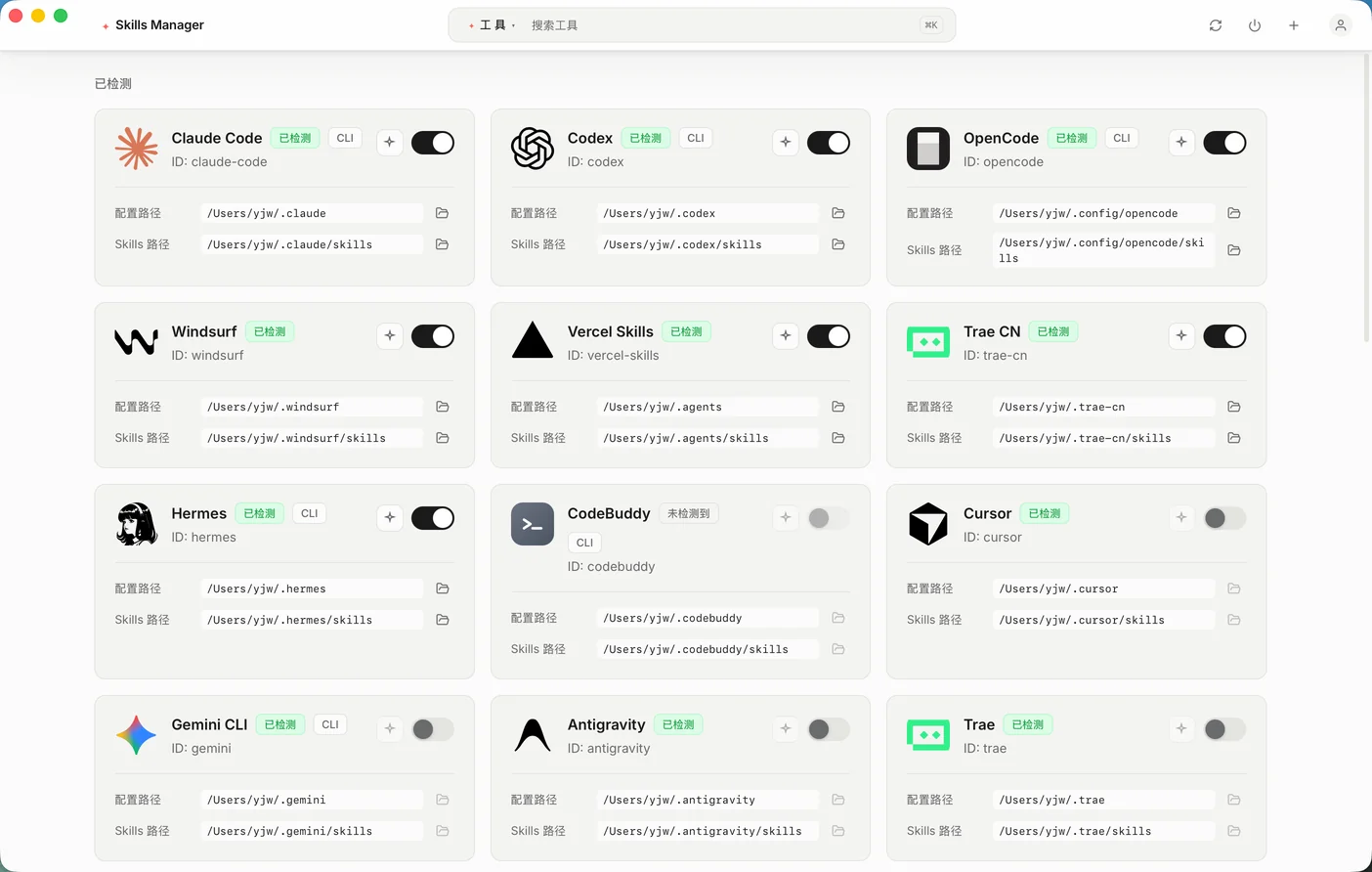
Skills Manager detects the AI coding tools installed on your machine and connects each one to the same central library, so a Skill you write once is available everywhere you work.
and 20 more tools — see the full directory matrix below
One Skill, one source file in ~/.skills-manager/skills — Skills Manager writes the connection into the directory each tool already scans. Everything stays single-copy and reversible.
| Tool | Skills directory | Detected by | Connection |
|---|---|---|---|
 Claude Code Claude Code | ~/.claude/skills | claude | Symlink / Junction |
 Codex Codex | ~/.codex/skills | codex | Symlink / Junction |
 Cursor Cursor | ~/.cursor/skills | cursor | Symlink / Junction |
 Gemini CLI Gemini CLI | ~/.gemini/skills | gemini | Symlink / Junction |
 OpenCode OpenCode | ~/.config/opencode/skills~/.opencode/skills | opencode | Symlink / Junction |
 Windsurf Windsurf | ~/.windsurf/skills | windsurf | Symlink / Junction |
 Cline Cline | ~/.cline/skills | cline | Symlink / Junction |
 Antigravity Antigravity | ~/.antigravity/skills | antigravity | Symlink / Junction |
 Vercel Skills Vercel Skills | ~/.agents/skills~/.vercel/skills~/.vercel-skills/skills | vercel | Symlink / Junction |
 Trae Trae | ~/.trae/skills | trae | Symlink / Junction |
 Qwen Code Qwen Code | ~/.qwen/skills | qwen | Symlink / Junction |
 Augment Augment | ~/.augment/skills | augment | Symlink / Junction |
 DeepSeek Harness DeepSeek Harness | ~/.dsh/skills | dsh | Symlink / Junction |
 CodeBuddy CodeBuddy | ~/.codebuddy/skills | codebuddy | Symlink / Junction |
 Droid Droid | ~/.factory/skills~/.droid/skills | droid | Symlink / Junction |
 OpenClaw OpenClaw | ~/.openclaw/skills | openclaw | Symlink / Junction |
 CommandCode CommandCode | ~/.commandcode/skills | commandcode | Symlink / Junction |
 Continue Continue | ~/.continue/skills | continue | Symlink / Junction |
 Crush Crush | ~/.config/crush/skills~/.crush/skills | crush | Symlink / Junction |
 Goose Goose | ~/.config/goose/skills~/.goose/skills | goose | Symlink / Junction |
 iFlow iFlow | ~/.iflow/skills | iflow | Copy mode |
 Junie Junie | ~/.junie/skills | junie | Symlink / Junction |
 Kilo Code Kilo Code | ~/.kilocode/skills | kilo | Symlink / Junction |
 Kiro Kiro | ~/.kiro/skills | kiro | Symlink / Junction |
 Qoder Qoder | ~/.qoder/skills | qoder | Symlink / Junction |
 Roo Code Roo Code | ~/.roo/skills | roo | Symlink / Junction |
 Zencoder Zencoder | ~/.zencoder/skills | zencoder | Symlink / Junction |
 Pi Pi | ~/.pi/agent/skills | pi | Symlink / Junction |
 Trae CN Trae CN | ~/.trae-cn/skills | trae | Symlink / Junction |
 Hermes Hermes | ~/.hermes/skills | hermes | Symlink / Junction |
 WorkBuddy WorkBuddy | ~/.workbuddy/skills | workbuddy | Symlink / Junction |
 QoderWork CN QoderWork CN | ~/.qoderworkcn/skills | qoderworkcn | Symlink / Junction |
Symlinks on macOS and Linux; on Windows the app falls back from symlink to junction, so no admin rights are needed. Copy mode is used only for iFlow, which does not follow links.
Add a custom tool by pointing Skills Manager at its configuration directory. The same library, toggles, and security scan apply to it.
Skills Manager keeps your canonical Skills in one library, then creates and maintains the connections each coding agent expects.

~/.skills-manager/skillsClaude CodeCodexCursorGemini CLIBring existing Skills into one managed library without rebuilding your setup.
Enable or disable a Skill per tool while keeping the source file untouched.
Symlink-based connections make edits available across tools without manual copies.
See every Skill, every connected tool, and every marketplace install in one focused workspace.
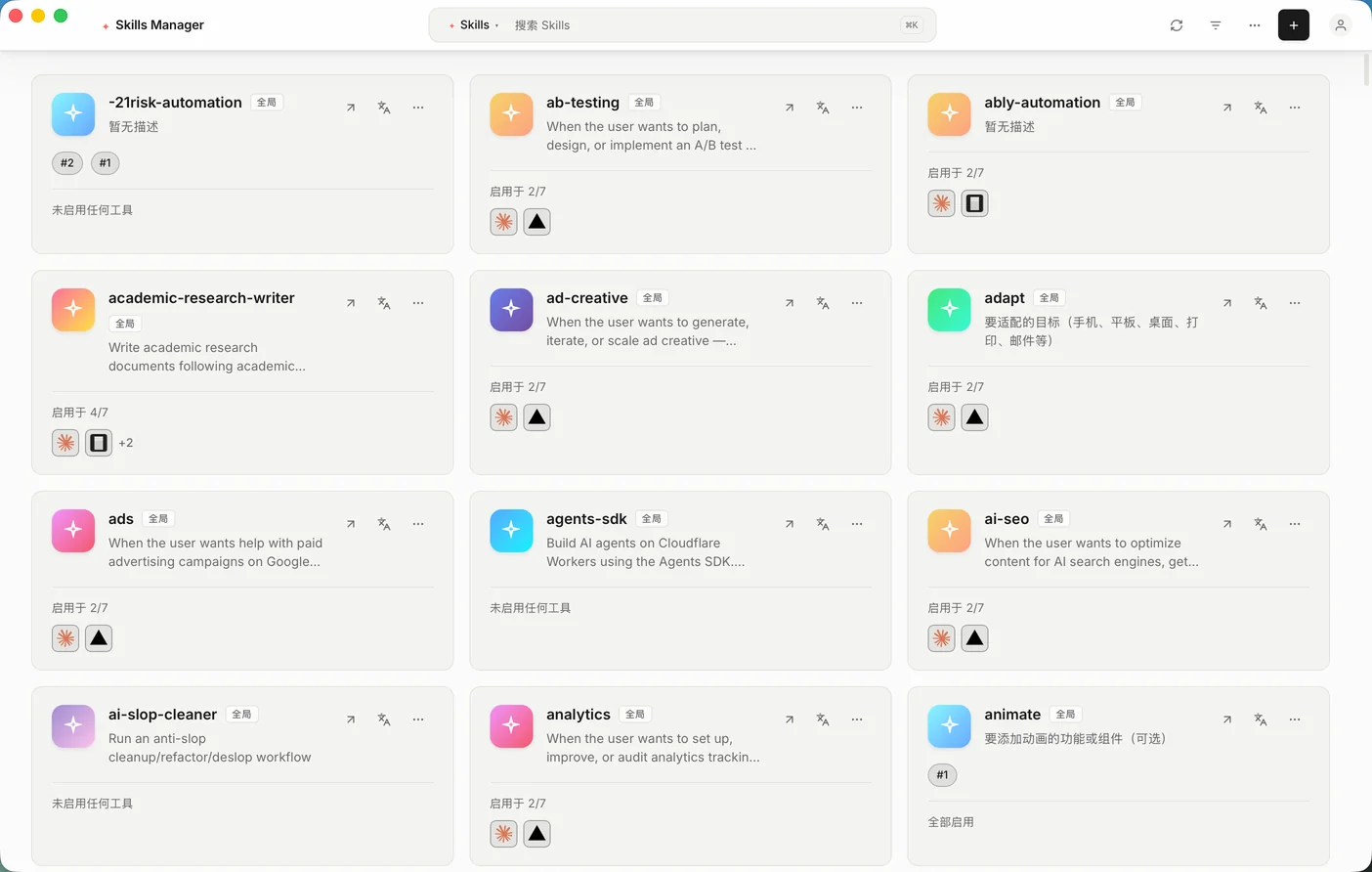
Skills Manager does not ask you to restructure anything first. It reads the Skills you already have, then takes over the wiring between them and your tools.
Download the build for your platform and open it. Skills Manager probes all 32 built-in tool directories and lists the ones it finds.
No account and nothing to configure first. Detection is read-only — nothing is written until you enable a Skill. If you would rather not use a GUI at all, skm init does the same setup from a terminal.
Point the app at the Skills already sitting in folders such as ~/.claude/skills. They move into the central library at ~/.skills-manager/skills.
Duplicates across tools collapse into one entry — you stop maintaining the same Skill in several places.
Flip a switch and the link appears inside the tool’s Skills directory. Flip it back and the link is gone — the source file is never modified.
Every tool points at the same file, so one edit lands everywhere at once.
Typical setup timeUnder 5 minutes
Run local static checks for dangerous commands, hidden downloads, privilege escalation, and suspicious instructions before enabling a Skill.
Deterministic rules run on your machine and keep source files private.
Add a second opinion for ambiguous or context-dependent findings.
Review the exact file, severity, rule, and remediation before installation.
security-audit/SKILL.mdA Skill can contain commands the agent will execute, so installing one from the internet is like running a script you did not read. Skills Manager scans the entire folder locally before you enable it — deterministic rules, same input, same verdict.
destructive.*9 rulesCommands that delete, overwrite, or destroy data on the machine running the Skill.
destructive.rm_rf_rootdestructive.mkfsdestructive.dd_to_devicedestructive.fork_bombnetwork.*9 rulesReverse shells, exfiltration, and anything that ships local files or credentials off-machine.
network.pipe_to_shellnetwork.nc_reverse_shellnetwork.curl_with_credsnetwork.scp_to_remoteprivilege.*9 rulesSudo, permission loosening, and edits that help the Skill survive a reboot or hijack later commands.
privilege.sudoprivilege.write_shell_rcprivilege.crontab_persistprivilege.path_hijackpayload.*9 rulesBase64-decoded execution, zero-width characters, and other tricks aimed at hiding intent.
payload.base64_decode_execpayload.eval_execpayload.zero_width_charspayload.rtl_overrideEach finding carries a confidence score mapped to a severity ladder. The report shows the highest severity first, then the exact file and line.
confidence ≥ 0.95confidence ≥ 0.80confidence ≥ 0.60confidence ≥ 0.40below 0.40A rm -rf line inside a doc example is not the same as one inside an instruction. The scanner records where each match appeared and weights it accordingly.
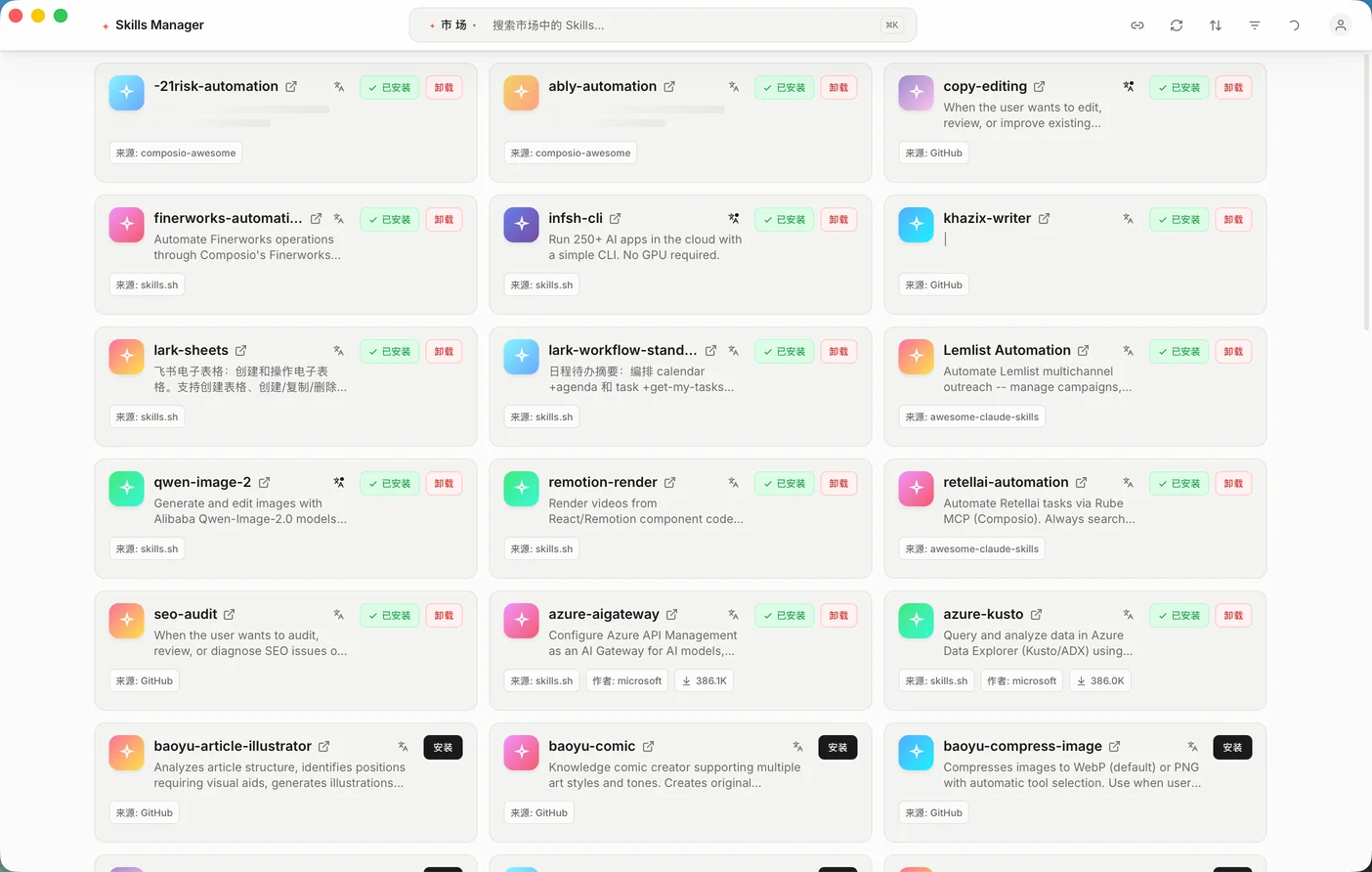
Browse community Skills inside the desktop app, inspect their source, install with one action, and translate content when needed.
Browse Skills from supported community catalogs and GitHub repositories.
Translate Skill names, descriptions, and instructions between English and Chinese.
Manual folders work until every agent needs its own copy. Skills Manager keeps the workflow visible and reversible as your toolset grows.
| Workflow | Manual folders | Skills Manager |
|---|---|---|
| Canonical Skill source | One copy per tool | One central library |
| Per-tool enable controls | Move files by hand | Built-in toggles |
| Tool discovery | Find every path yourself | Automatic detection |
| Security review | Read every file manually | Local static scan |
| English and Chinese | Translate by hand | Integrated translation |
Agent Skills are the portable format AI coding agents load on demand. Getting them right starts with knowing what a Skill is — and what it is not.
Agents index the front matter and match it against the task. The description decides whether the Skill loads at all — write it more carefully than the name.
nameRequiredLowercase identifier for the Skill. Convention is to match the folder name, using hyphens instead of spaces.
descriptionRequiredWhat the Skill does and when to use it. Write both halves — the trigger condition is what makes the Skill fire at the right moment.
allowed-toolsOptionalRestricts the Skill to a specific set of tools. Supported by Claude Code; other agents ignore fields they do not recognise.
Markdown bodyRequiredThe instructions the agent follows after the Skill is triggered. Keep it short and imperative; link out to reference files for anything long.
---
name: release-notes
description: Drafts release notes from merged pull requests. Use when
  the user asks for a changelog or release summary for a version tag.
allowed-tools: Bash(git log:*), Read, Write
---

# Release notes

1. Collect merged pull requests since the previous tag.
2. Group them by type: feat, fix, perf, docs.
3. Write one line per change, newest first.
Skills and MCP servers are not alternatives. A Skill encodes a procedure; an MCP server grants access to a system the agent cannot reach on its own. Most real setups use both.
| Dimension | Agent Skills | MCP servers |
|---|---|---|
| What it adds | Procedure and domain knowledge | Connections to external systems |
| Format | A folder with SKILL.md and support files | A running server speaking a JSON-RPC protocol |
| Runtime cost | None until the Skill is triggered | A process and a live connection per server |
| Loaded when | The task matches the description | The agent starts, tools listed up front |
| Authoring effort | Write Markdown | Write and ship a server |
| Best fit | Repeatable workflows, house style, checklists | Databases, ticketing, internal APIs |
Rule of thumb: a task you can write down is a Skill; a task that needs live data or credentials is an MCP server. Skills Manager manages the first.
A Tauri desktop app that runs locally, reaching the network only for features you explicitly start.
Skills Manager is maintained by one developer in public. This section states who wrote the page, where each claim comes from, and what the product deliberately does not do.
Product numbers come from the source files that define them, not from marketing copy. Anything describing Agent Skills or MCP follows the official specification rather than a second-hand summary.
| Claim on this page | Primary source |
|---|---|
| 32 built-in tools and their Skills directories | src-tauri/src/models/tool.rs |
| 36 static security rules across four categories | src-tauri/src/services/risk/rules.rs |
| Symlink, junction, and copy fallback behaviour | src-tauri/src/services/linker.rs |
| What an Agent Skill is and how SKILL.md is loaded | Anthropic — Agent Skills documentation |
| How to write a description that triggers reliably | Anthropic — Skill authoring best practices |
| What an MCP server is and how it differs from a Skill | Model Context Protocol specification |
| Directory junctions need no elevation on Windows | Microsoft Learn — mklink |
Knowing the limits matters more than the feature list when you are deciding whether to trust a tool with your setup.
The security scan is static analysis over the files in a Skill folder. It matches patterns in text and cannot observe what a command actually does at runtime, so a novel or heavily obfuscated payload can pass a clean scan. Treat the result as a first filter, not a guarantee.
The marketplace lives inside the desktop app. This site does not host browsable Skill pages, and there is no public API for searching Skills from a browser.
iFlow does not follow filesystem links, so Skills Manager keeps a tracked copy for it and records the source path. That copy does not update on its own after you edit the source — toggling the Skill off and on re-copies the folder. Every other supported tool sees the edit immediately.
Both features are optional and off by default. When you start one, the Skill content is sent to the language model provider you configured with your own API key. Everything else — organizing, linking, scanning — never leaves your machine.
Page last reviewedReviewed against the shipping build and the linked sources above.
Download Skills Manager, connect your tools, and stop maintaining the same Skill in multiple folders.
v2.1.8Choose the build for your Mac
64-bit Windows 10 or later
64-bit desktop distributions
macOS only. The cask picks the build for your CPU, and brew upgrade keeps it current.
brew install --cask jiweiyeah/tap/skills-managerThe app is not notarized by Apple, so the cask clears the quarantine flag on install. What that means
skm drives the same central library from a shell, so the desktop app is optional: skm init followed by skm adopt is a complete terminal-only setup, which is what you need on a headless server or in a dotfiles script. Both read and write the same config and the same links, so you can mix them freely.
skm initskm adopt --dry-runskm enable <skill> --for <tool>skm doctor --jsonAlready running the desktop app? Settings → Command Line Tool installs the same binary, plus a companion Skill that documents the flags for your agents. CLI documentation
Skills Manager is MIT-licensed and developed in public.